

Cancellations
We understand that circumstances sometimes change and there'll be a need to cancel the session you've booked. This guide tells you how to cancel on site and app and when cancellations.
You can manage your bookings by visiting 'My Bookings' on the website. Click the 'Manage' button and select the option of choice. Sessions booked via membership will automatically be recredited and must be used before the membership expires; PAYG bookings will not be recredited automatically. See below for more information on refunds.
Rescheduling can only be done to a like-for-like session i.e. a Social Wednesday for a Social Wednesday where the cost of each session is the same. If you wish to reschedule to a different session i.e. Social Wednesday for a Ladder Wednesday, monthly members should cancel the original session and rebook with their automatic recredit and PAYG members should contact the organiser to arrange this.


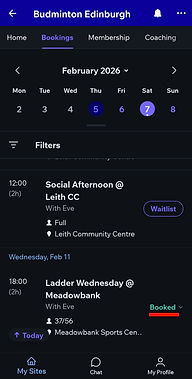
To manage app bookings:
-
Go to the Bookings Tab
-
Find the booking either under 'Your bookings' or by searching the calendar
-
Select the booking you wish to amend by clicking '...' or 'Booked'
-
As with website bookings, membership cancellations are recredited automatically and refunds for PAYG bookings must be requested by filling out the form.


Refunds
Bookings are non-refundable if cancelled less than 24 hours before the session starts, regardless of the reason. Any monies or coupons used will not be refunded or recredited after this time. If you need to cancel within 24 hours, please contact us. Failure to do so will result in a no-show - three no-shows in a three-month period will result in your booking privileges being suspended. Our full refund policy can be read in the help section.